PRINT AND CREATE · REMOTE MCP PLUGIN

Sheetwise Label Maker
Turn a list into a PDF for standard address and shipping label sheets.
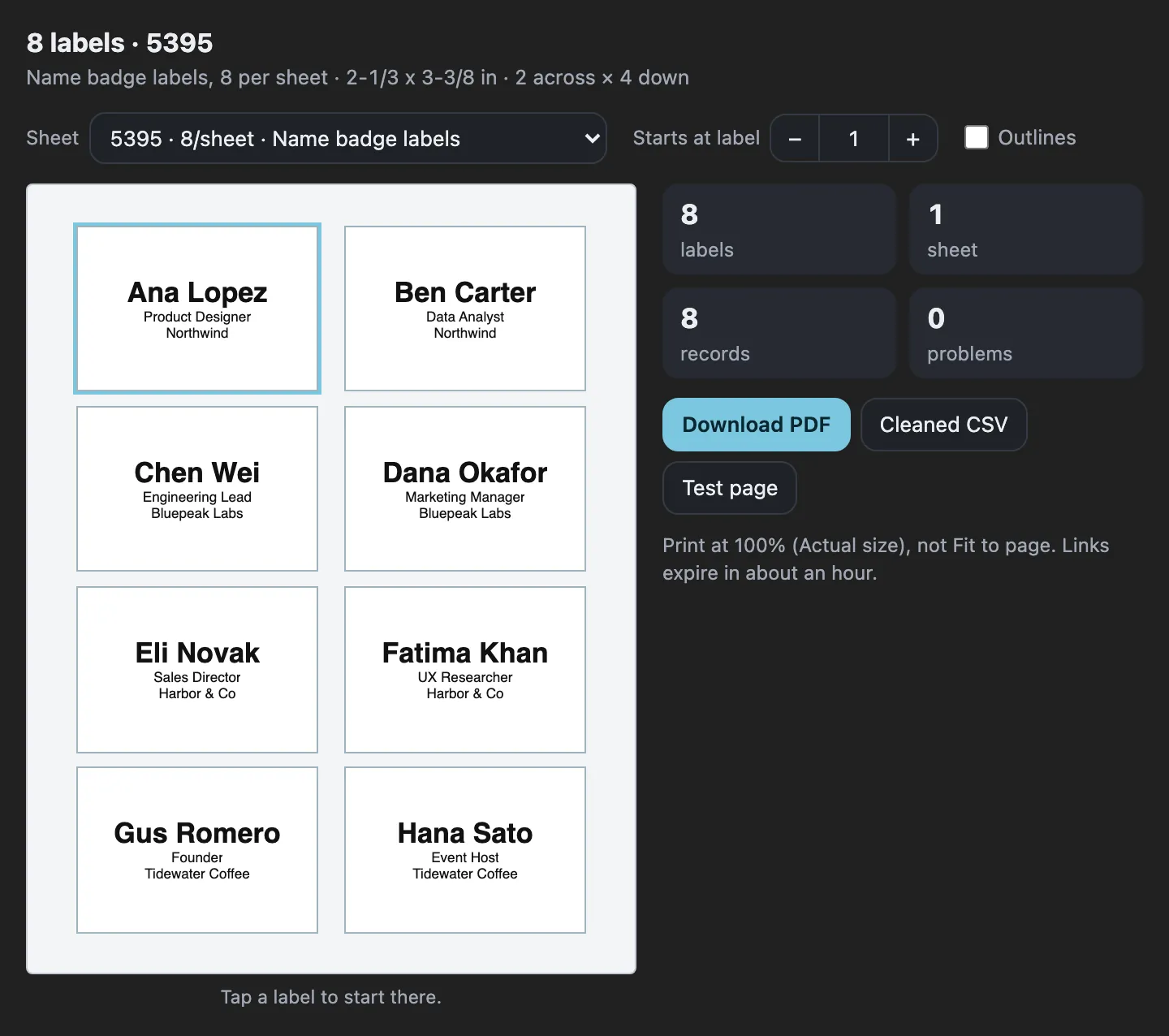
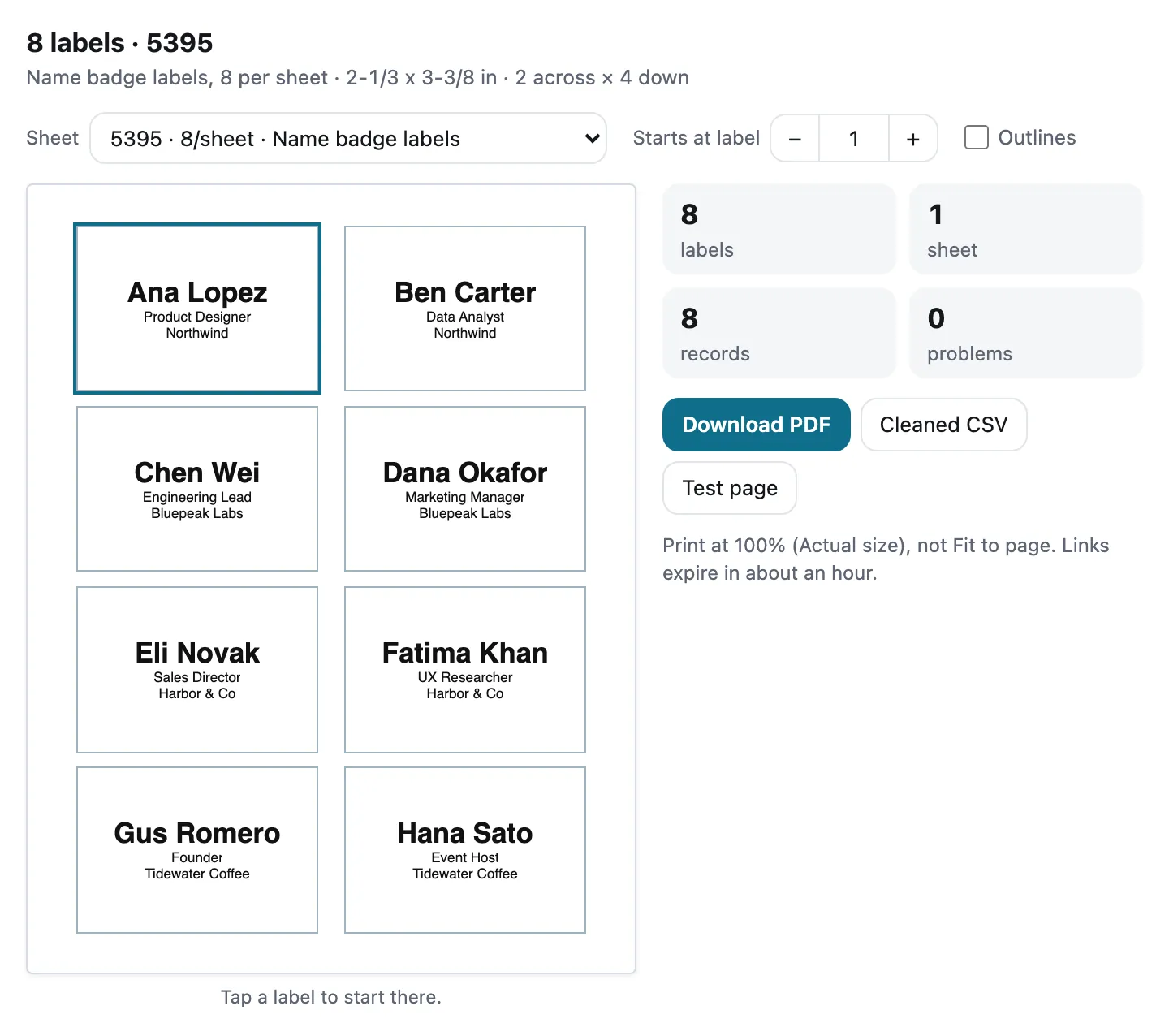
You askMake Avery 5395 name badges for Ana Lopez (Product Designer, Northwind), Ben Carter (Data Analyst, Northwind), Chen Wei (Engineering Lead, Bluepeak Labs), Dana Okafor (Marketing Manager, Bluepeak Labs), Eli Novak (Sales Director, Harbor & Co), Fatima Khan (UX Researcher, Harbor & Co), Gus Romero (Founder, Tidewater Coffee) and Hana Sato (Event Host, Tidewater Coffee)
RELEASE CHECK · 16 NOV 2026
A reviewed release is recorded.
The fleet records a reviewed source release after the 11 Oct 2026 review. That source check does not certify every input or every account.
The shared widget fix is recorded in this release. It prevents a repeated host result from resetting work already entered in the widget.
See the fleet snapshot and its limits ↗LIVE IN A PUBLIC DIRECTORY
ChatGPT: open the listing and select Install plugin. Your plan and workspace can limit access.
Custom connections require support in your AI app, plan, and workspace. Follow the host guide before you use the prompt.
A TASK TO TRY
Give the plugin a clear task.
Make Avery 5395 name badges for Ana Lopez (Product Designer, Northwind), Ben Carter (Data Analyst, Northwind), Chen Wei (Engineering Lead, Bluepeak Labs), Dana Okafor (Marketing Manager, Bluepeak Labs), Eli Novak (Sales Director, Harbor & Co), Fatima Khan (UX Researcher, Harbor & Co), Gus Romero (Founder, Tidewater Coffee) and Hana Sato (Event Host, Tidewater Coffee)
WHAT THE SERVER EXPOSES
3 functions to request.
Names and descriptions below come from live MCP discovery. They describe the server; they are not a test of every function in ChatGPT or Claude.
Generate label sheet PDF
generate_label_sheetUse this when the user wants to print address labels, mailing labels, return address labels, shipping labels, name badges or name tags, place cards, or file folder labels from a list or a spreadsheet ("avery 5160 template", "print address labels from excel", "mailing labels from excel", "make return address labels", "print christmas card addresses on labels", "start printing at label 7 on a used sheet"). Builds a vector PDF on US Letter that lines up with the chosen label sheet (5160/8160 30 per sheet, 5161, 5162, 5163, 5164, 5168, 5126, 5167, 5195, 5366, 5395, 5390, 22805, 5302 place cards), with USPS address lines, font shrink-to-fit, a start position for partly used sheets, copies per label, return-address fill mode, an optional alignment test page and outlines. Accepts typed labels or an uploaded CSV/XLSX file. Returns a preview, the PDF and a cleaned CSV. Does not buy postage, print USPS shipping labels with postage, make barcodes, or design nutrition labels.
Find label sheet size
find_label_templateUse this when the user asks which label sheet to use or what the measurements of a sheet are ("avery 5160 size", "avery 5160 label size", "30 labels per sheet template", "1 x 2-5/8 labels", "name badge label size", "which labels for return address"). Searches the supported US Letter label sheets by product number, label size, labels per sheet or use, and returns the layout: label size, columns and rows, top/side margins, pitch and products with the same layout. Does not print labels (use generate_label_sheet) and does not cover A4 sheets or label-maker tape.
Check mailing list
check_mailing_listUse this when the user wants to check or clean a mailing list or contact list before printing labels ("turn my contact list into mailing labels", "address labels from excel spreadsheet", "clean up my address list"): reads an uploaded CSV/XLSX file or a typed list, shows which columns were used for name, street, city, state and ZIP, formats each address the USPS way, and reports missing streets, cities, states, ZIP codes, unknown state codes and duplicates, with a cleaned CSV download. Does not verify that an address exists, does not look up ZIP+4, and does not print the labels (use generate_label_sheet).
Connect. Ask. Check.
- Use the setup guide for ChatGPT or Claude. Copy this plugin's endpoint.
- Connect the tool. Paste the sample prompt and supply the inputs it needs.
- Review the result before you rely on it. Check the source tool's limits and privacy terms.
ADAPT THIS TASK TO YOUR WORK
Need a different input or output?
Start a brief from Sheetwise Label Maker. Describe your inputs, the result you need, and the checks that define a useful result. Download it before you share it.
The brief runs in your browser. Custom projects need a separate scope and price agreement.
EXPLORE THE SAME TASK CATEGORY
More print and create tools.
These tools have reviewed releases in the dated fleet snapshot. Check each plugin's limits and setup before use.
Create barcodes with check-digit checks and printable PNG or SVG files.
Turn family relationships into a printable tree or pedigree chart.
Turn a team list into a laid-out org chart with SVG and PDF downloads.


COLLECTIONS