PRINT AND CREATE · REMOTE MCP PLUGIN

Zovo Family Tree
Turn family relationships into a printable tree or pedigree chart.
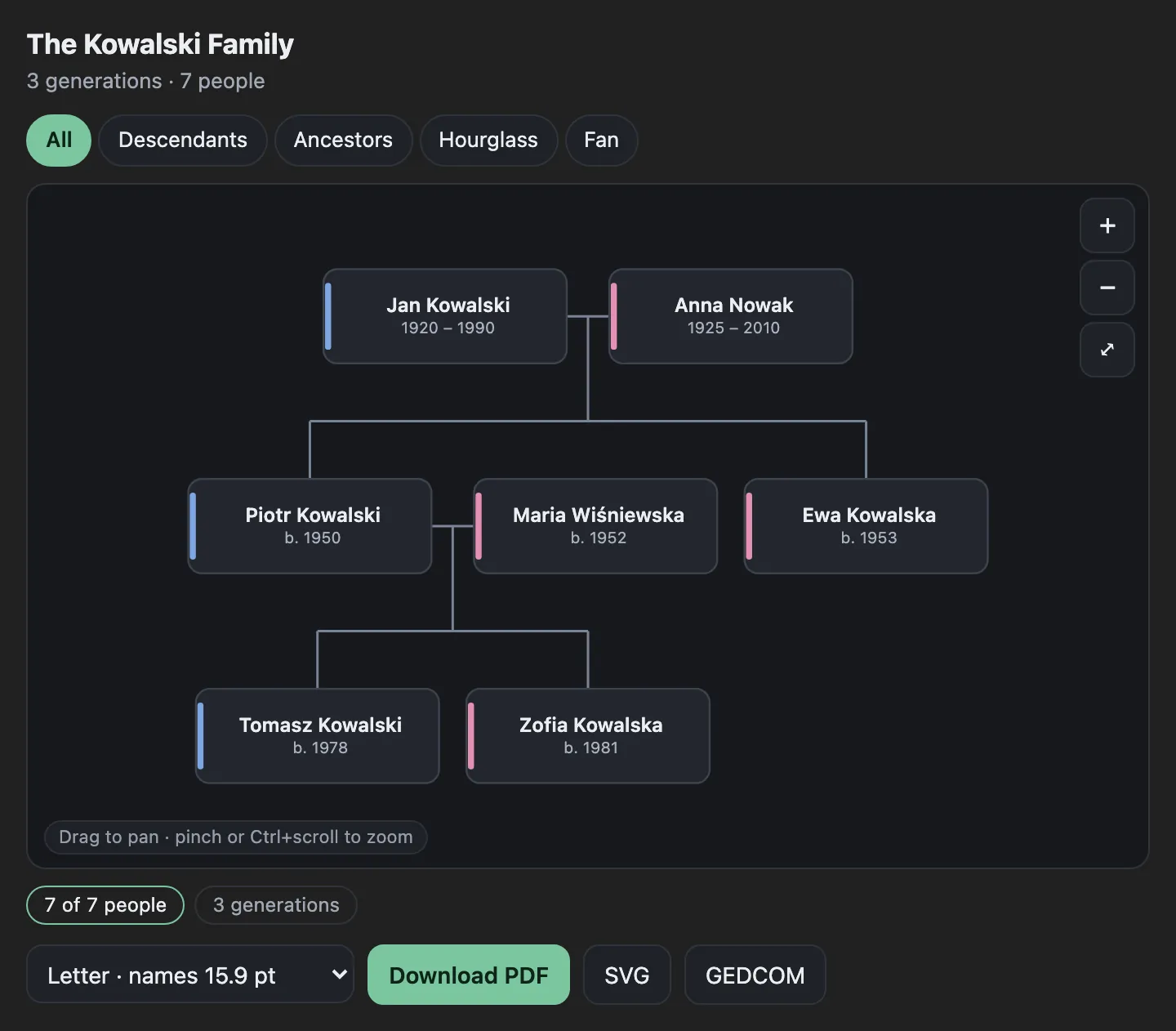
You askTree poster 'The Kowalski Family': Jan Kowalski (1920-1990) wed Anna Nowak (1925-2010) in 1948; kids Piotr (1950), Ewa (1953). Piotr & wife Maria Wiśniewska (1952) have Tomasz (1978), Zofia (1981)
RELEASE CHECK · 16 NOV 2026
A reviewed release is recorded.
The fleet records a reviewed source release after the 11 Oct 2026 review. That source check does not certify every input or every account.
Release score 90/100 after an administrator deployment ruling; the raw reviewer score was 65/100. The ruling closed a difference between the old live server and corrected source, with a recorded post-deploy check.
The shared widget fix is recorded in this release. It prevents a repeated host result from resetting work already entered in the widget.
See the fleet snapshot and its limits ↗LIVE IN A PUBLIC DIRECTORY
ChatGPT: open the listing and select Install plugin. Claude: open the listing (listed as Rootline Family Tree) and add it to your account. Your plan and workspace can limit access.
Custom connections require support in your AI app, plan, and workspace. Follow the host guide before you use the prompt.
A TASK TO TRY
Give the plugin a clear task.
Tree poster 'The Kowalski Family': Jan Kowalski (1920-1990) wed Anna Nowak (1925-2010) in 1948; kids Piotr (1950), Ewa (1953). Piotr & wife Maria Wiśniewska (1952) have Tomasz (1978), Zofia (1981)
CHECKED EXAMPLE · SYNTHETIC INPUT
Print a three-person fictional family
Two parents and one child produce a two-generation chart with no overlapping boxes.
Exact input: Title: A fictional family. People: ana = Ana; bo = Bo; cy = Cy, with parents [ana, bo]. No dates, sex, or spouse records supplied.
| Check | Observed result |
|---|---|
| People shown | 3 |
| Generations | 2 |
| Overlapping boxes | 0 |
Limit: The tool draws the relationships you supply; it does not research ancestors or verify family records.
Live MCP sample checked on 15 October 2026. Sample input only. No customer or family records were used. This sample does not certify every input or an installation in each AI app.
WHAT THE SERVER EXPOSES
2 functions to request.
Names and descriptions below come from live MCP discovery. They describe the server; they are not a test of every function in ChatGPT or Claude.
Generate family tree chart
generate_family_treeUse this when the user wants a family tree, genealogy chart, pedigree chart, descendant chart, hourglass chart, fan chart or a printable family tree poster or template from relatives they describe. Convert the description into people (id, name, born, died, sex, parents, spouses) and call once. Lays out generations, couples, remarriages, half-siblings, adoption and twins without overlaps; returns a zoomable chart, PDF posters (Letter, A4, A2, 18x24, 24x36 in), SVG and a GEDCOM 5.5.1 file. Does not research ancestors, find records, or import GEDCOM files; do not invent relatives or dates. Not for organisation charts or flowcharts.
Find relationship between two relatives
find_relationshipUse this when the user asks how two people in their family are related (for example second cousin once removed, great-aunt, half-brother, mother-in-law, stepsister) and gives the family links. Pass the same people list as for the family tree and the two people. Computes the exact English kinship term both ways, the closest common ancestors and the generations to them. Does not guess missing links or research genealogy records; DNA matches and percentages are not covered.
Connect. Ask. Check.
- Use the setup guide for ChatGPT or Claude. Copy this plugin's endpoint.
- Connect the tool. Paste the sample prompt and supply the inputs it needs.
- Review the result before you rely on it. Check the source tool's limits and privacy terms.
ADAPT THIS TASK TO YOUR WORK
Need a different input or output?
Start a brief from Zovo Family Tree. Describe your inputs, the result you need, and the checks that define a useful result. Download it before you share it.
The brief runs in your browser. Custom projects need a separate scope and price agreement.
EXPLORE THE SAME TASK CATEGORY
More print and create tools.
These tools have reviewed releases in the dated fleet snapshot. Check each plugin's limits and setup before use.
Turn a team list into a laid-out org chart with SVG and PDF downloads.
Set a practice metronome, convert tempo to note durations, and plan a tempo ladder.
Transpose chord sheets between keys and compare guitar capo options.


COLLECTIONS