EVERYDAY · REMOTE MCP PLUGIN
Zovo Charity Lookup
Check a US nonprofit's tax-exempt status, revenue, expenses and officer pay from IRS Form 990 data.
Live official dataThe answer comes from ProPublica Nonprofit Explorer, IRS Form 990 data at the time you ask. Each result shows the source and the retrieval time in UTC.See all live data plugins
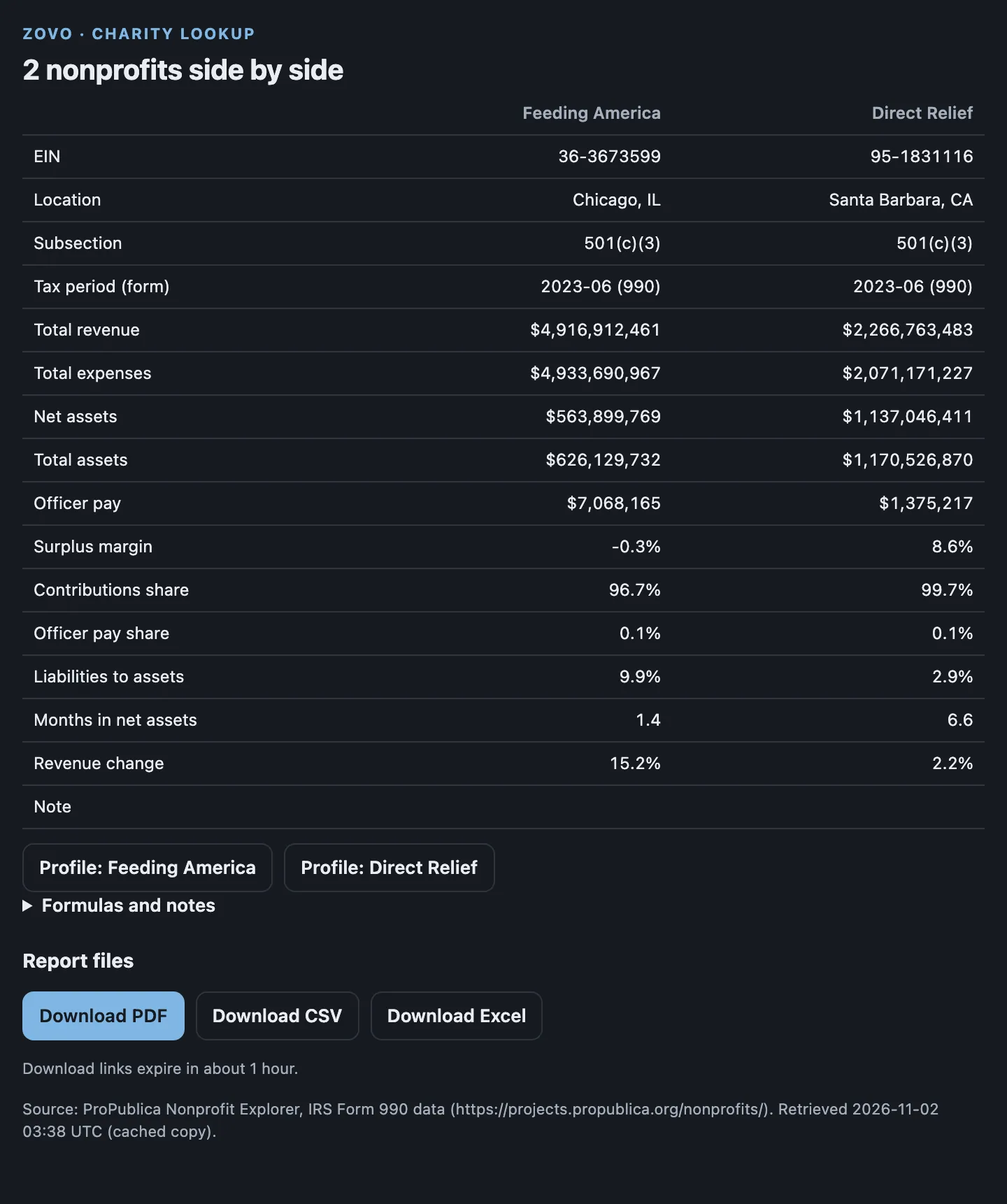
You askCompare Feeding America, EIN 36-3673599, and Direct Relief, EIN 95-1831116, on revenue, expenses and net assets
RELEASE CHECK · 2 NOV 2026
A release review is not recorded yet.
This server is live and passed its build checks on 2 Nov 2026. An independent release review isn't recorded here yet. Inspect its limits and test a synthetic example before relying on it.
See the fleet snapshot and its limits ↗Custom connections require support in your AI app, plan, and workspace. Follow the host guide before you use the prompt.
A TASK TO TRY
Give the plugin a clear task.
Compare Feeding America, EIN 36-3673599, and Direct Relief, EIN 95-1831116, on revenue, expenses and net assets
BEFORE YOU CONNECT
Check the limits.
Anonymous server discovery is checked. A current installation and widget test in both hosts is not recorded for this release.
- Figures come from the IRS extract of processed returns, so the newest return can take a year or more to appear.
- Small organizations that file only a 990-N postcard have no figures.
- There is no program expense ratio, because the extract has no program-service split.
- It shows facts and formulas, not ratings. Check revocations in IRS Tax Exempt Organization Search.
WHAT THE SERVER EXPOSES
3 functions to request.
Names and descriptions below come from live MCP discovery. They describe the server; they are not a test of every function in ChatGPT or Claude.
Search nonprofits
search_nonprofitsUse this when the user wants to find a US nonprofit or charity and its EIN by name, optionally in one US state or one category. Returns up to 25 matches with EIN, city, state, NTEE code and IRS subsection, from ProPublica Nonprofit Explorer. Does not return financials; use get_nonprofit_profile with an EIN for those. Do not use for organizations outside the US.
Get nonprofit profile
get_nonprofit_profileUse this when the user wants to check a US nonprofit by EIN: IRS subsection, foundation status, deductibility, ruling date, and a multi-year table of revenue, expenses, net assets, total assets and officer compensation from Form 990 filings, with year-over-year change, ratios and their formulas, filing PDF links, and a PDF, CSV and Excel report. Data is live from ProPublica Nonprofit Explorer. Does not rate or rank organizations and does not give tax or legal advice.
Compare nonprofits
compare_nonprofitsUse this when the user wants 2 to 5 US nonprofits side by side by EIN: latest Form 990 revenue, expenses, net assets, total assets, officer compensation and computed ratios with formulas, plus a PDF, CSV and Excel comparison. Data is live from ProPublica Nonprofit Explorer. Does not rate or rank organizations. Do not use with names; find EINs with search_nonprofits first.
Connect. Ask. Check.
- Use the setup guide for ChatGPT or Claude. Copy this plugin's endpoint.
- Connect the tool. Paste the sample prompt and supply the inputs it needs.
- Review the result before you rely on it. Check the source tool's limits and privacy terms.
ADAPT THIS TASK TO YOUR WORK
Need a different input or output?
Start a brief from Zovo Charity Lookup. Describe your inputs, the result you need, and the checks that define a useful result. Download it before you share it.
The brief runs in your browser. Custom projects need a separate scope and price agreement.
COLLECTIONS