DEVELOPER · REMOTE MCP PLUGIN

Zovo Palette Lab
Check color contrast and find nearby colors that pass your target ratio.
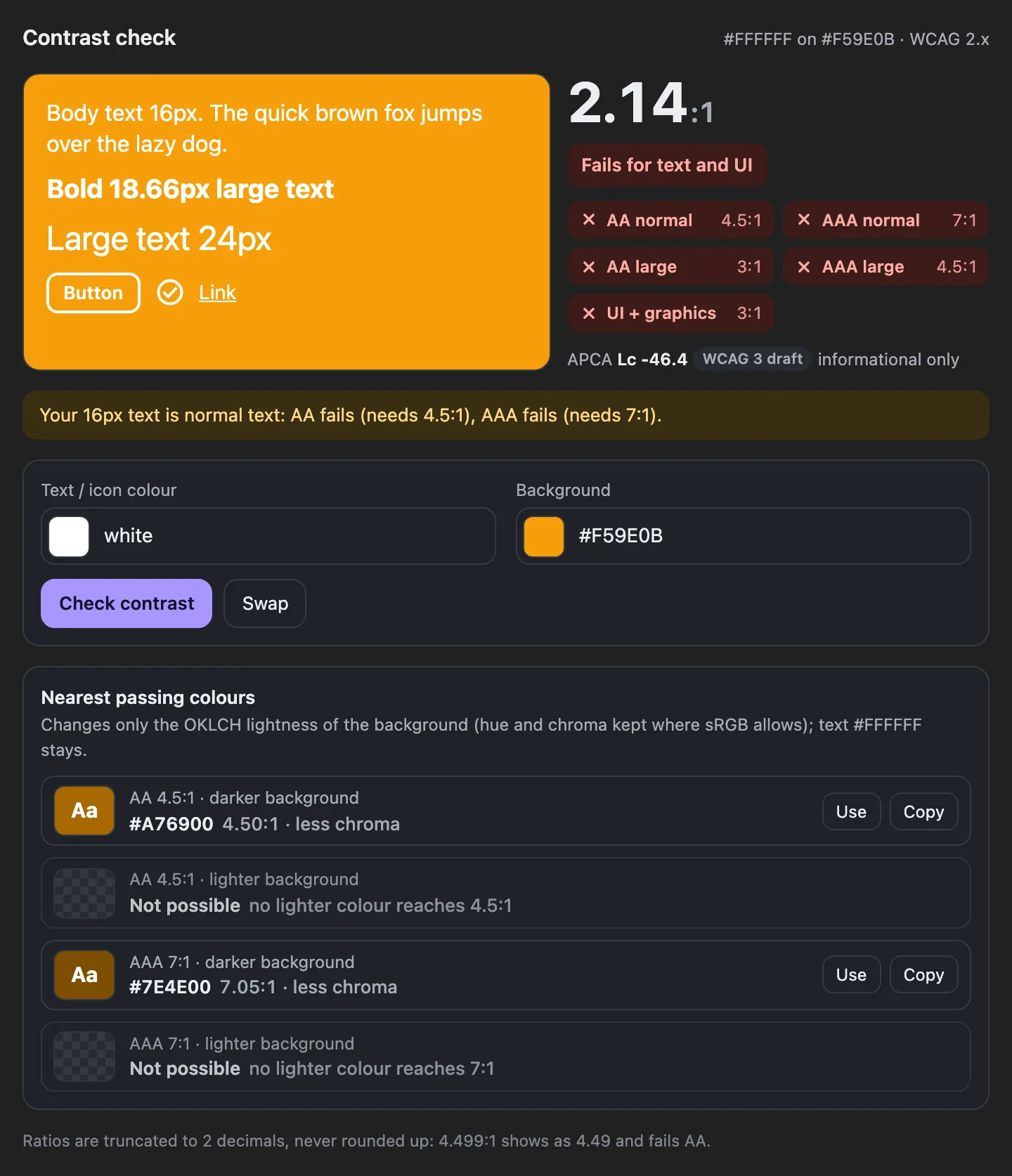
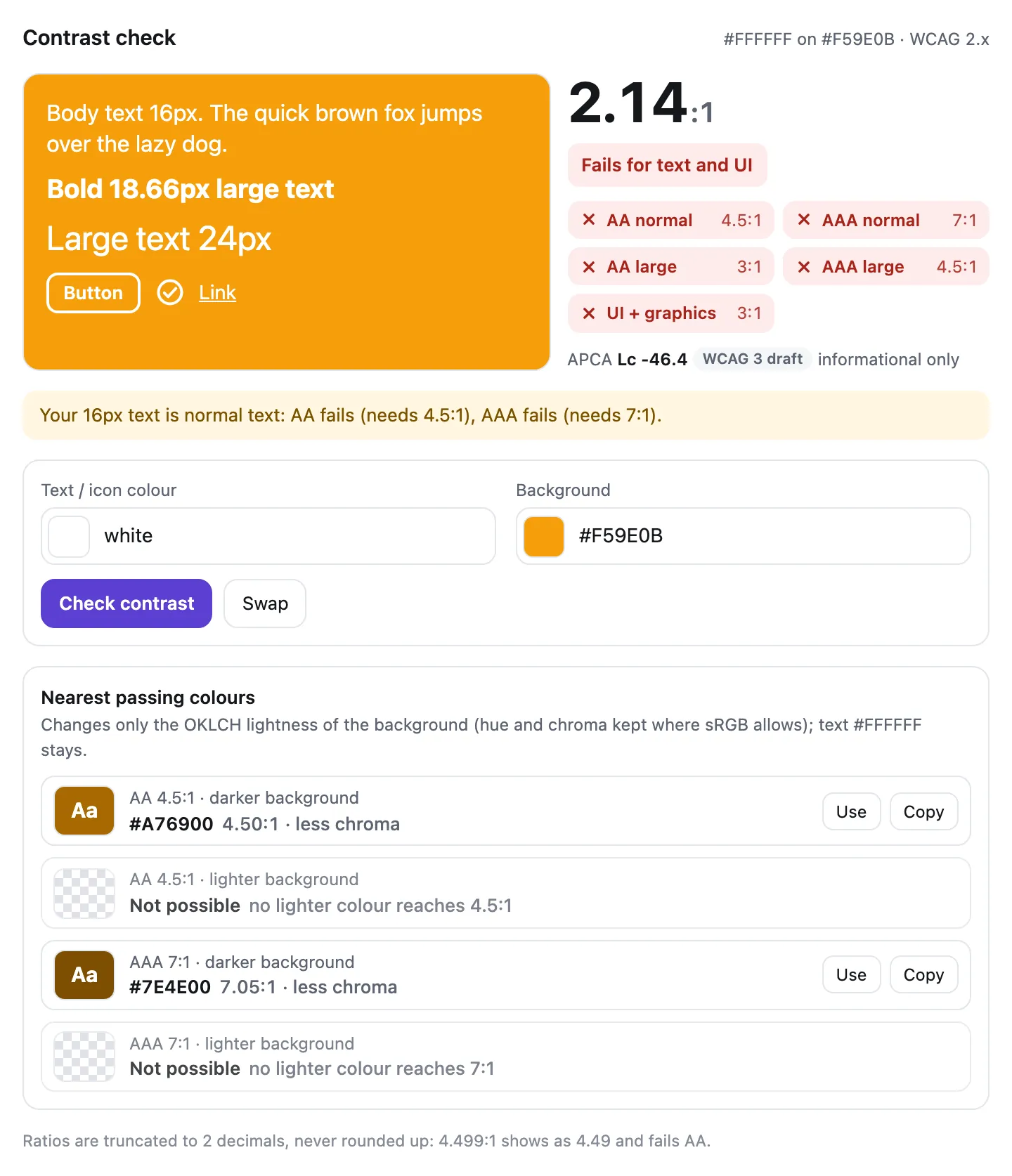
You askCheck if white text on #F59E0B passes WCAG AA for body text and suggest the closest passing color
RELEASE CHECK · 16 NOV 2026
A reviewed release is recorded.
The fleet records a reviewed source release after the 11 Oct 2026 review. That source check does not certify every input or every account.
The shared widget fix is recorded in this release. It prevents a repeated host result from resetting work already entered in the widget.
See the fleet snapshot and its limits ↗LIVE IN A PUBLIC DIRECTORY
ChatGPT: open the listing and select Install plugin. Claude: open the listing (listed as HueCheck Palette Lab) and add it to your account. Your plan and workspace can limit access.
Custom connections require support in your AI app, plan, and workspace. Follow the host guide before you use the prompt.
A TASK TO TRY
Give the plugin a clear task.
Check if white text on #F59E0B passes WCAG AA for body text and suggest the closest passing color
WHAT THE SERVER EXPOSES
3 functions to request.
Names and descriptions below come from live MCP discovery. They describe the server; they are not a test of every function in ChatGPT or Claude.
Check color contrast
check_color_contrastUse this when the user wants to know whether a text, icon or border colour has enough contrast against a background: a WCAG contrast checker for one colour pair (e.g. "does white text on #F59E0B pass WCAG AA", "contrast ratio of #767676 on white", "what text color for this background"). Returns the exact WCAG 2.x ratio (truncated to 2 decimals, never rounded up), AA/AAA results for normal text, large text and UI components, a verdict for a given font size, APCA Lc as draft information, and the nearest passing colours for AA and AAA (darker and lighter, same OKLCH hue and chroma). Accepts hex, 8-digit hex with alpha, rgb(), hsl(), hwb(), lab(), lch(), oklab(), oklch(), color(display-p3 ...) and CSS colour names; wide-gamut colours are clipped to sRGB with a note. Does not read colours from images or web pages, resolve CSS variables or currentColor, or check gradients as a whole (check each stop). For 3 or more colours use check_palette_contrast.
Check palette contrast
check_palette_contrastUse this when the user has a colour palette (2 to 12 colours) and wants to know which combinations are accessible: "check contrast of my color palette", "which of these colors can I use for text", "accessible color palette checker". Returns the full pairwise WCAG 2.x contrast matrix (ratios truncated, never rounded up), which pairs pass AA/AAA for text or 3:1 for large text and UI, and a recommended text colour for each background (a palette colour that passes AA, otherwise black or white). Does not generate new colours; use generate_accessible_palette for a tonal scale and check_color_contrast for fixes to one pair.
Generate accessible palette
generate_accessible_paletteUse this when the user wants an accessible colour scale or palette built from one colour: "color palette generator from hex", "generate a 50-950 scale from #1E6FD9", "tailwind color palette generator", "accessible color palette for my website". Builds an 11-step 50-950 tonal scale in OKLCH with the base hue, where 50-400 pass AA with black text, 500 passes AA with both white and black text, 600 passes AA with white text and 700-950 pass AAA with white text, and every ratio is reported. Returns CSS custom properties and a Tailwind config as downloads. Does not pick colours by mood or brand meaning and does not extract palettes from images.
Connect. Ask. Check.
- Use the setup guide for ChatGPT or Claude. Copy this plugin's endpoint.
- Connect the tool. Paste the sample prompt and supply the inputs it needs.
- Review the result before you rely on it. Check the source tool's limits and privacy terms.
ADAPT THIS TASK TO YOUR WORK
Need a different input or output?
Start a brief from Zovo Palette Lab. Describe your inputs, the result you need, and the checks that define a useful result. Download it before you share it.
The brief runs in your browser. Custom projects need a separate scope and price agreement.
EXPLORE THE SAME TASK CATEGORY
More developer tools.
These tools have reviewed releases in the dated fleet snapshot. Check each plugin's limits and setup before use.
SEC filings and reported company financials, straight from EDGAR.
Check if a website is up right now, from the edge, with header grades and a CSV.
Count words and characters. Check text against a length limit.


COLLECTIONS