PLANNING · REMOTE MCP PLUGIN

Pathline Project Planner
Find the tasks that set a project’s duration and calculate their float.
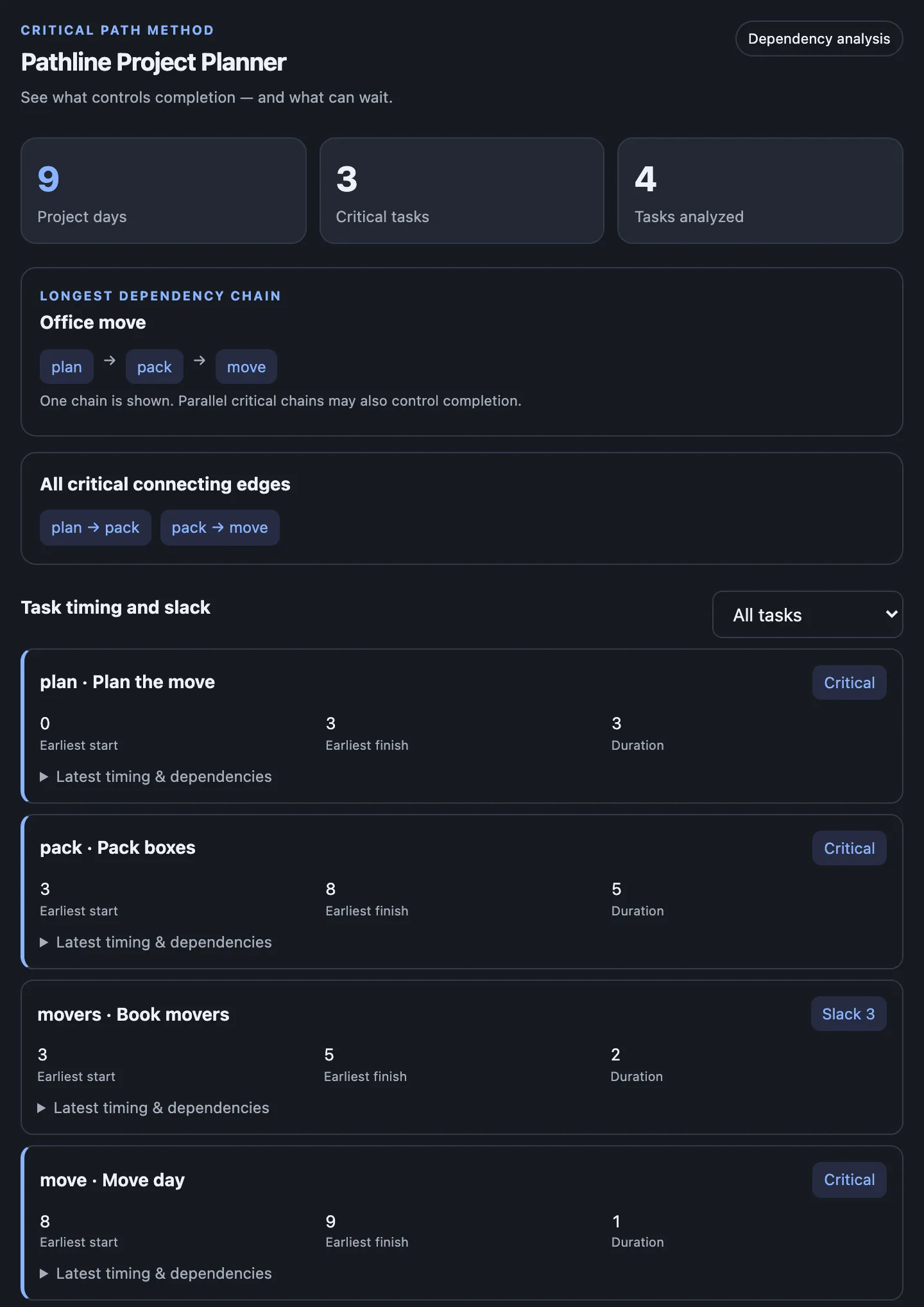
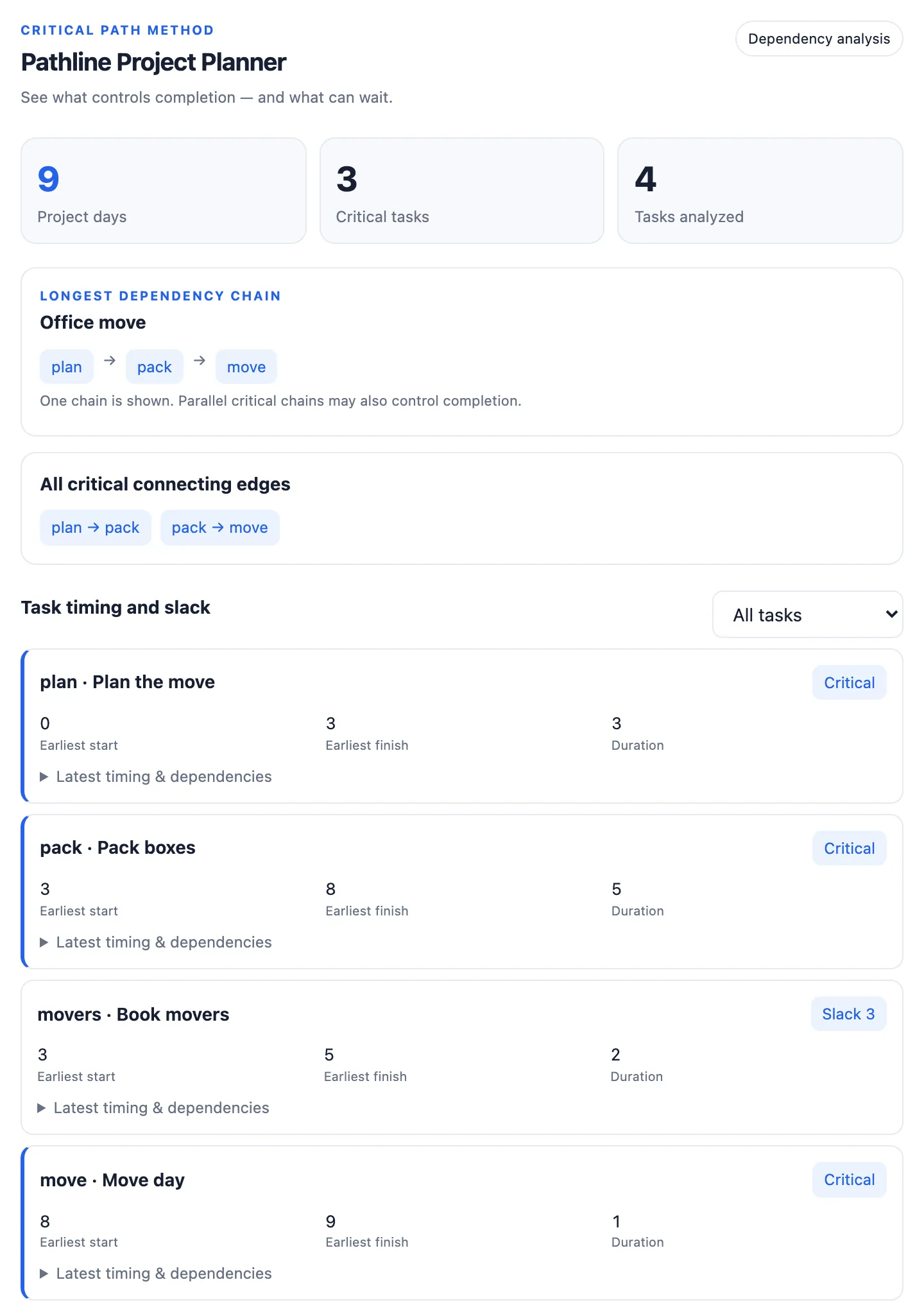
You askFind the critical path for our office move. Plan the move takes 3 days. Pack boxes takes 5 days after planning. Book movers takes 2 days after planning. Move day takes 1 day after packing and booking movers.
RELEASE CHECK · 16 NOV 2026
A reviewed release is recorded.
The fleet records a reviewed source release after the 11 Oct 2026 review. That source check does not certify every input or every account.
The shared widget fix is recorded in this release. It prevents a repeated host result from resetting work already entered in the widget.
See the fleet snapshot and its limits ↗LIVE IN A PUBLIC DIRECTORY
ChatGPT: open the listing and select Install plugin. Your plan and workspace can limit access.
Custom connections require support in your AI app, plan, and workspace. Follow the host guide before you use the prompt.
A TASK TO TRY
Give the plugin a clear task.
Find the critical path for our office move. Plan the move takes 3 days. Pack boxes takes 5 days after planning. Book movers takes 2 days after planning. Move day takes 1 day after packing and booking movers.
WHAT THE SERVER EXPOSES
1 function to request.
Names and descriptions below come from live MCP discovery. They describe the server; they are not a test of every function in ChatGPT or Claude.
Calculate critical path
calculate_critical_pathUse this when the user wants a critical path calculation, project duration, earliest/latest task starts and finishes, or task slack from explicit durations and dependencies. Accepts one to forty tasks, at most 160 finish-to-start dependencies, and durations with at most three decimal places. Includes parallel critical tasks and a CSV schedule. Does not schedule calendar dates, generate Gantt charts, account for resources or holidays, or infer missing task durations.
Connect. Ask. Check.
- Use the setup guide for ChatGPT or Claude. Copy this plugin's endpoint.
- Connect the tool. Paste the sample prompt and supply the inputs it needs.
- Review the result before you rely on it. Check the source tool's limits and privacy terms.
ADAPT THIS TASK TO YOUR WORK
Need a different input or output?
Start a brief from Pathline Project Planner. Describe your inputs, the result you need, and the checks that define a useful result. Download it before you share it.
The brief runs in your browser. Custom projects need a separate scope and price agreement.
EXPLORE THE SAME TASK CATEGORY
More planning tools.
These tools have reviewed releases in the dated fleet snapshot. Check each plugin's limits and setup before use.
Build a shift roster from staffing needs and availability.
Count Schengen short-stay days and model a planned trip under the 90/180 rule.
Find sunrise, sunset, golden hour, and blue hour times by city and date.


COLLECTIONS