PLANNING · REMOTE MCP PLUGIN

Rotawise Shift Scheduler
Build a shift roster from staffing needs and availability.
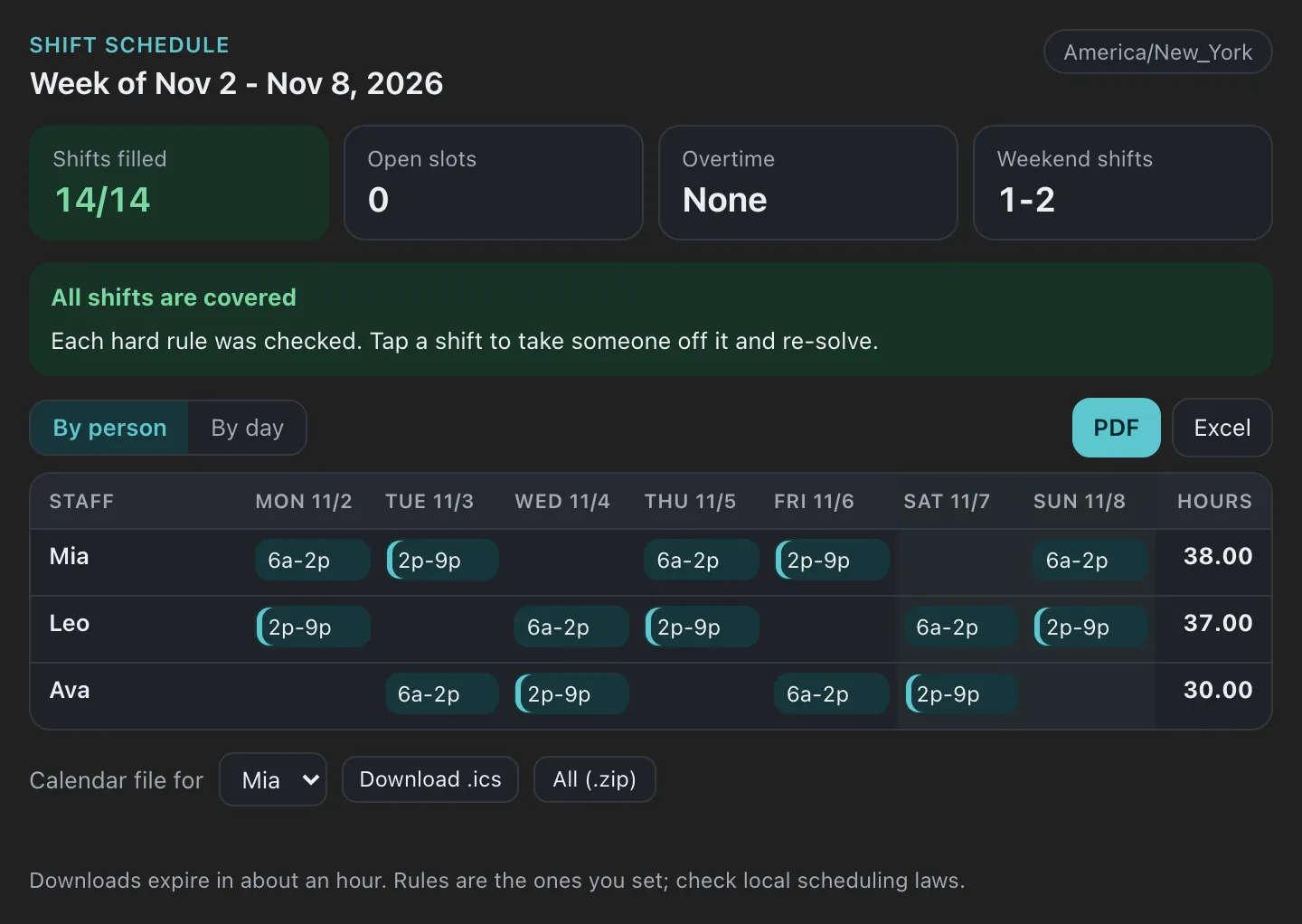
You askCoffee shop schedule in New York for the week of November 2, 2026 with 3 part timers: Mia, Leo, Ava. Shifts 6am-2pm and 2pm-9pm daily, 1 person each, max 40 h each
RELEASE CHECK · 16 NOV 2026
A reviewed release is recorded.
The fleet records a reviewed source release after the 11 Oct 2026 review. That source check does not certify every input or every account.
The shared widget fix is recorded in this release. It prevents a repeated host result from resetting work already entered in the widget.
See the fleet snapshot and its limits ↗LIVE IN A PUBLIC DIRECTORY
ChatGPT: open the listing and select Install plugin. Your plan and workspace can limit access.
Custom connections require support in your AI app, plan, and workspace. Follow the host guide before you use the prompt.
A TASK TO TRY
Give the plugin a clear task.
Coffee shop schedule in New York for the week of November 2, 2026 with 3 part timers: Mia, Leo, Ava. Shifts 6am-2pm and 2pm-9pm daily, 1 person each, max 40 h each
WHAT THE SERVER EXPOSES
2 functions to request.
Names and descriptions below come from live MCP discovery. They describe the server; they are not a test of every function in ChatGPT or Claude.
Make a shift schedule
generate_shift_scheduleUse this when the user wants an employee schedule maker or work schedule maker: build a weekly staff or shift schedule for a restaurant, cafe, retail store, clinic front desk or similar from staff names, roles or skills, availability (days or times people cannot work), min/max hours, and the shifts to cover with headcount, e.g. "make a weekly schedule for 6 employees", "need 2 people on each shift, nobody over 40 hours", "make a rotating schedule so weekends are fair", "who should close on friday", "Sam cannot work Mondays". Accepts typed lists or an attached availability CSV/XLSX. A deterministic solver checks each hard rule (roles, availability, max hours, overtime cap, minimum rest between shifts, shifts per day, consecutive days), balances weekend and closing shifts, and when coverage is impossible returns each open shift with the binding reason. Returns hours per person, overtime flags, fairness ranges, and a printable PDF, Excel file and per-employee calendar (.ics) files. Overnight shifts and daylight-saving weeks are counted in real elapsed hours. Does not post schedules, message staff, track clock-ins or run payroll. Do not use for job searches or for checking a schedule the user already made (use check_schedule).
Check a shift schedule
check_scheduleUse this when the user already has a work schedule and wants it checked against scheduling rules: "check this schedule", "does anyone have a clopening", "is anyone over 40 hours", "fix this schedule, Sam cannot work Mondays". Takes the shifts with the people on them (typed, or an attached schedule CSV/XLSX grid or list) plus optional staff rules (roles, max hours, unavailable days) and reports each problem it finds: overlapping or double-booked shifts, less rest than the rule between shifts, too many shifts per day or days in a row, over max hours or overtime, wrong role, unavailable times, and shifts below headcount. Returns hours per person and a PDF, Excel and per-employee calendar files of the checked schedule. Does not change the schedule itself (generate_shift_schedule builds a corrected one) and does not give legal advice on scheduling laws.
Connect. Ask. Check.
- Use the setup guide for ChatGPT or Claude. Copy this plugin's endpoint.
- Connect the tool. Paste the sample prompt and supply the inputs it needs.
- Review the result before you rely on it. Check the source tool's limits and privacy terms.
ADAPT THIS TASK TO YOUR WORK
Need a different input or output?
Start a brief from Rotawise Shift Scheduler. Describe your inputs, the result you need, and the checks that define a useful result. Download it before you share it.
The brief runs in your browser. Custom projects need a separate scope and price agreement.
EXPLORE THE SAME TASK CATEGORY
More planning tools.
These tools have reviewed releases in the dated fleet snapshot. Check each plugin's limits and setup before use.
Count Schengen short-stay days and model a planned trip under the 90/180 rule.
Find sunrise, sunset, golden hour, and blue hour times by city and date.
Count calendar or business days and check public holidays.


COLLECTIONS