PLANNING · REMOTE MCP PLUGIN

Zovo Date Calculator
Count calendar or business days and check public holidays.
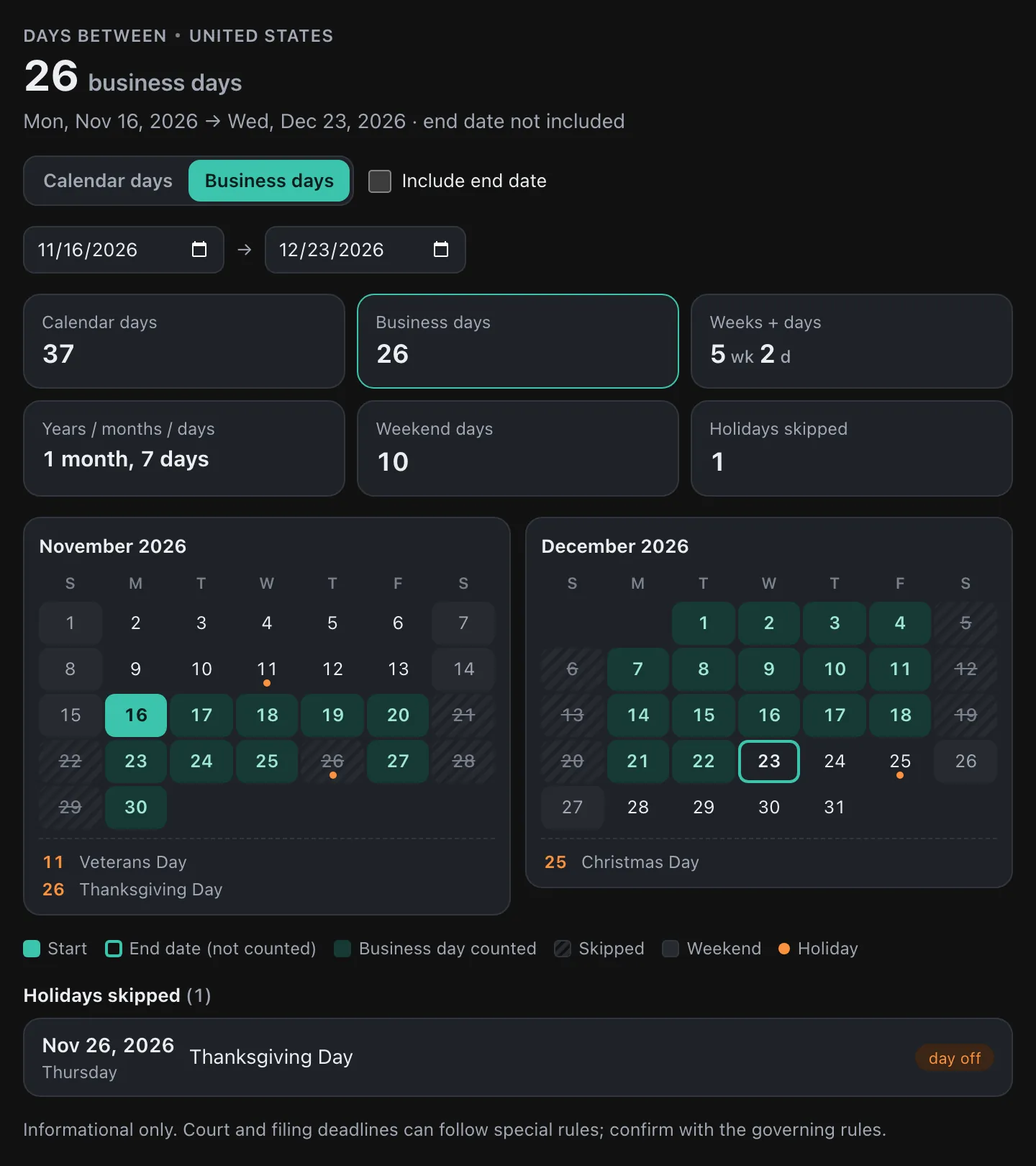
You askHow many business days are there in the US from November 16 to December 23, 2026?
RELEASE CHECK · 16 NOV 2026
A reviewed release is recorded.
The fleet records a reviewed source release after the 11 Oct 2026 review. That source check does not certify every input or every account.
The shared widget fix is recorded in this release. It prevents a repeated host result from resetting work already entered in the widget.
See the fleet snapshot and its limits ↗LIVE IN A PUBLIC DIRECTORY
ChatGPT: open the listing and select Install plugin. Your plan and workspace can limit access.
Custom connections require support in your AI app, plan, and workspace. Follow the host guide before you use the prompt.
A TASK TO TRY
Give the plugin a clear task.
How many business days are there in the US from November 16 to December 23, 2026?
WHAT THE SERVER EXPOSES
3 functions to request.
Names and descriptions below come from live MCP discovery. They describe the server; they are not a test of every function in ChatGPT or Claude.
Count days between dates
count_days_betweenUse this when the user asks how many days are between two dates (days between dates, count days, date calculator), how many business days or working days are between two dates, or days between dates excluding weekends and public holidays for a country or US state. Returns calendar days, weeks and days, years/months/days, business days, and the holidays skipped by name. The start date is counted; set include_end_date=true to also count the end date (Excel NETWORKDAYS style). Does not handle times of day or time zones. Holidays that fall on a weekend are not double-counted, and their observed weekday off (for example US Independence Day 2026 on Saturday is observed Friday July 3) is skipped as a holiday. Results are informational: legal deadlines may have special rules such as court holidays. Do not use for writing SQL or spreadsheet formulas.
Find a date N days before or after
calculate_date_offsetUse this when the user wants the date that is N days or N business days (working days) before or after a date: 'what date is 90 days from today', '30 business days from Nov 3, 2026 in Germany', '10 working days before 2027-01-15', shipping or contract deadlines. Business days skip weekends and the public holidays of the given country and state, including observed weekdays for holidays that fall on a weekend (US July 4, 2027 is a Sunday, so Monday July 5 is skipped); the start date is not counted. For calendar days, roll=next_business_day moves a result that lands on a weekend or holiday to the next business day. Returns the date with its weekday, the holidays skipped, and a calendar (.ics) file. Results are informational: court and filing deadlines may have special rules (court holidays, service days). Does not handle times of day.
List public holidays
list_holidaysUse this when the user asks which public holidays (bank holidays) a country or a state/region has in a year, e.g. 'Poland public holidays 2026' or 'Texas state holidays 2027', usually to plan working days. Returns each holiday with date, weekday, English name and whether it falls on a weekend, including the observed weekday off when a holiday falls on a weekend, plus a CSV file. Does not include school holidays, religious observances that are not days off, or company-specific closures. Do not use to check whether a stock exchange is open.
Connect. Ask. Check.
- Use the setup guide for ChatGPT or Claude. Copy this plugin's endpoint.
- Connect the tool. Paste the sample prompt and supply the inputs it needs.
- Review the result before you rely on it. Check the source tool's limits and privacy terms.
ADAPT THIS TASK TO YOUR WORK
Need a different input or output?
Start a brief from Zovo Date Calculator. Describe your inputs, the result you need, and the checks that define a useful result. Download it before you share it.
The brief runs in your browser. Custom projects need a separate scope and price agreement.
EXPLORE THE SAME TASK CATEGORY
More planning tools.
These tools have reviewed releases in the dated fleet snapshot. Check each plugin's limits and setup before use.
Run a focus timer and export planned work blocks to your calendar.
Find meeting times across time zones and working hours.
Build a project timeline and see how a late task changes the finish date.


COLLECTIONS