PLANNING · REMOTE MCP PLUGIN

Zovo Project Timeline
Build a project timeline and see how a late task changes the finish date.
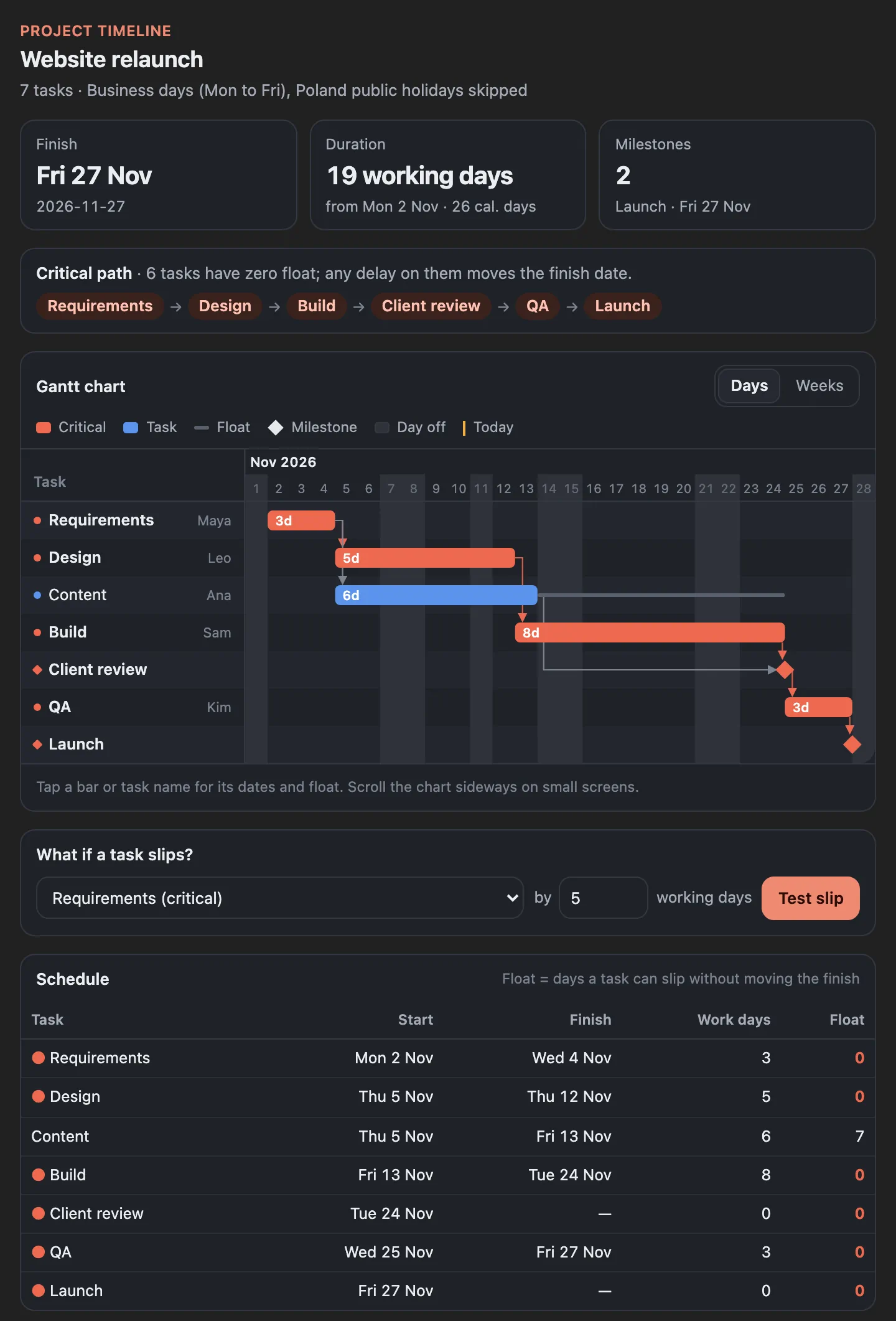
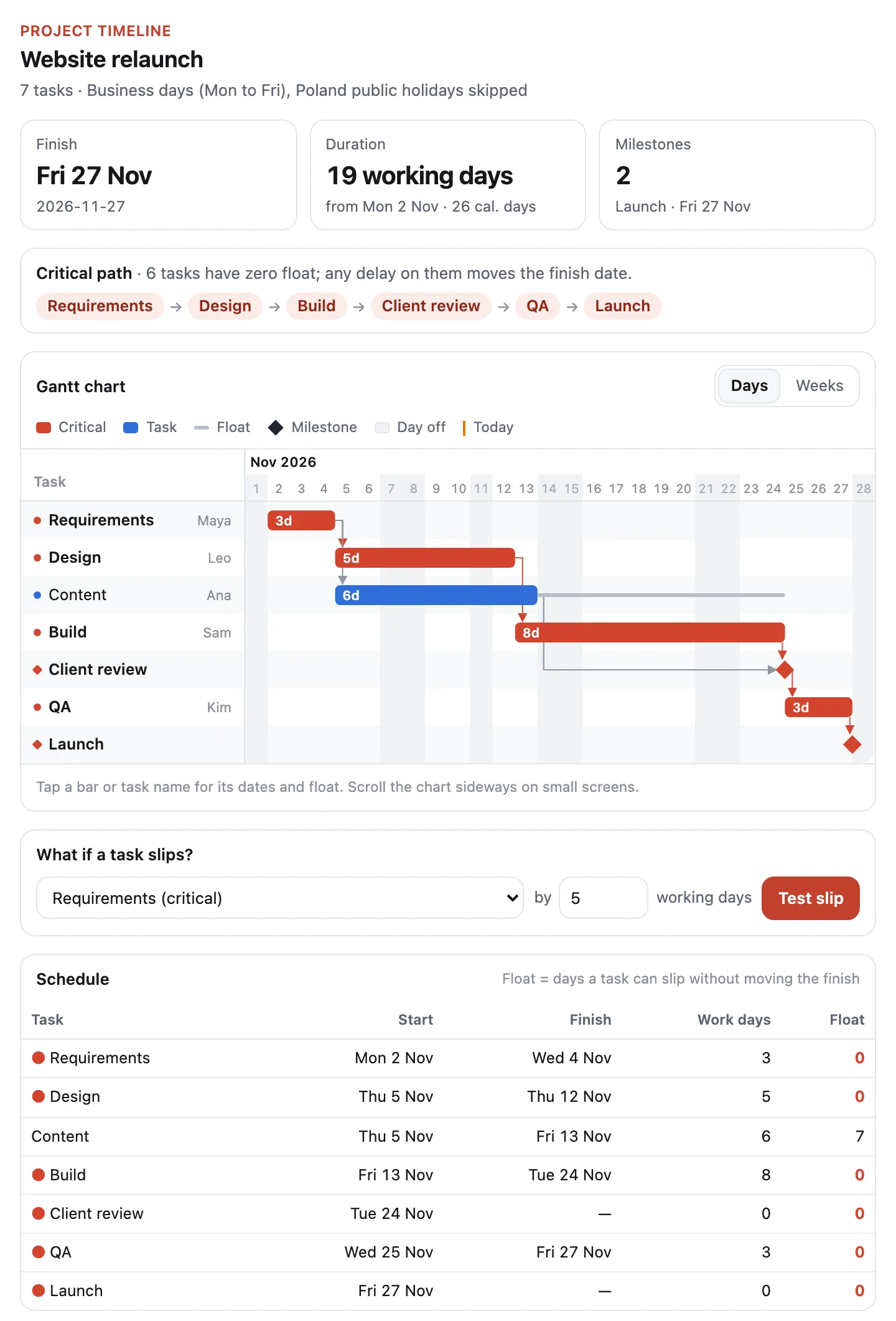
You askPlan our website relaunch on Polish workdays from 2026-11-02: Requirements 3d (Maya); Design 5d (Leo) and Content 6d (Ana) after it; Build 8d (Sam) after Design; client review; QA 3d (Kim); Launch
RELEASE CHECK · 16 NOV 2026
A reviewed release is recorded.
The fleet records a reviewed source release after the 11 Oct 2026 review. That source check does not certify every input or every account.
The shared widget fix is recorded in this release. It prevents a repeated host result from resetting work already entered in the widget.
See the fleet snapshot and its limits ↗LIVE IN A PUBLIC DIRECTORY
ChatGPT: open the listing and select Install plugin. Claude: open the listing (listed as Ganttly Project Timeline) and add it to your account. Your plan and workspace can limit access.
Custom connections require support in your AI app, plan, and workspace. Follow the host guide before you use the prompt.
A TASK TO TRY
Give the plugin a clear task.
Plan our website relaunch on Polish workdays from 2026-11-02: Requirements 3d (Maya); Design 5d (Leo) and Content 6d (Ana) after it; Build 8d (Sam) after Design; client review; QA 3d (Kim); Launch
CHECKED EXAMPLE · SYNTHETIC INPUT
Schedule a five-workday launch
A two-day preparation task followed by a three-day build finishes on Friday, November 6.
Exact input: Project: Sample launch. Start: 2026-11-02; country: PL; business days. A Prepare 2d; B Build 3d after A; C Launch 0d milestone after B.
| Task | Start | Finish |
|---|---|---|
| Prepare | 2026-11-02 | 2026-11-03 |
| Build | 2026-11-04 | 2026-11-06 |
| Launch milestone | 2026-11-06 | 2026-11-06 |
Limit: This schedule uses finish-to-start links and whole days. It does not level people’s workloads, track progress, or sync a project tool.
Live MCP sample checked on 15 October 2026. Sample input only. No customer or family records were used. This sample does not certify every input or an installation in each AI app.
WHAT THE SERVER EXPOSES
2 functions to request.
Names and descriptions below come from live MCP discovery. They describe the server; they are not a test of every function in ChatGPT or Claude.
Plan project timeline
plan_project_timelineUse this when the user wants a Gantt chart, project timeline, project schedule or project plan with milestones from a task list, wants to find the critical path and project duration, or asks for early start, early finish, late start, late finish, total float or free float (critical path method). Takes tasks with durations (days or weeks), finish-to-start dependencies with optional lags, optional start-no-earlier-than dates, owners and milestones, plus a start date and a business-day calendar with country public holidays or calendar days. Returns every task's dates and float, the critical path, milestones and the end date, an interactive Gantt chart, and CSV, .ics and SVG downloads. Detects dependency loops and unknown task names. Does not save projects, sync with project tools, track progress, or level resources. Do not use for a single date difference or for daily to-do planning.
Compare timeline what-ifs
compare_timeline_scenariosUse this when the user asks what happens to a project schedule if a task slips, takes longer or shorter, or starts later: for example "if Design slips 5 days, when do we finish?" or "does the critical path change?". Takes the same task list and calendar as plan_project_timeline plus 1 to 4 scenarios, each with changes (extra_days, a new duration, or a new start-no-earlier-than date). Returns the baseline and each scenario's end date, the delay in working and calendar days, the new critical path, tasks that became or stopped being critical, and how much of each slip was absorbed by float. Does not change or save the plan. Do not use for the first schedule of a project (use plan_project_timeline).
Connect. Ask. Check.
- Use the setup guide for ChatGPT or Claude. Copy this plugin's endpoint.
- Connect the tool. Paste the sample prompt and supply the inputs it needs.
- Review the result before you rely on it. Check the source tool's limits and privacy terms.
ADAPT THIS TASK TO YOUR WORK
Need a different input or output?
Start a brief from Zovo Project Timeline. Describe your inputs, the result you need, and the checks that define a useful result. Download it before you share it.
The brief runs in your browser. Custom projects need a separate scope and price agreement.
EXPLORE THE SAME TASK CATEGORY
More planning tools.
These tools have reviewed releases in the dated fleet snapshot. Check each plugin's limits and setup before use.
Score choices against weighted criteria and test which assumptions change the result.
Create calendar files for single, repeating, or multi-session events.
Make a packing list you can check off and print.


COLLECTIONS