PLANNING · REMOTE MCP PLUGIN

InviteKit Calendar Files
Create calendar files for single, repeating, or multi-session events.
You askMake a calendar invite for 'Product launch webinar' on 2026-11-05 from 18:30 to 20:00 Warsaw time with a 30-minute reminder, and show the time in New York
RELEASE CHECK · 16 NOV 2026
A reviewed release is recorded.
The fleet records a reviewed source release after the 11 Oct 2026 review. That source check does not certify every input or every account.
The shared widget fix is recorded in this release. It prevents a repeated host result from resetting work already entered in the widget.
See the fleet snapshot and its limits ↗LIVE IN A PUBLIC DIRECTORY
ChatGPT: open the listing and select Install plugin. Claude: open the listing and add it to your account. Your plan and workspace can limit access.
Custom connections require support in your AI app, plan, and workspace. Follow the host guide before you use the prompt.
A TASK TO TRY
Give the plugin a clear task.
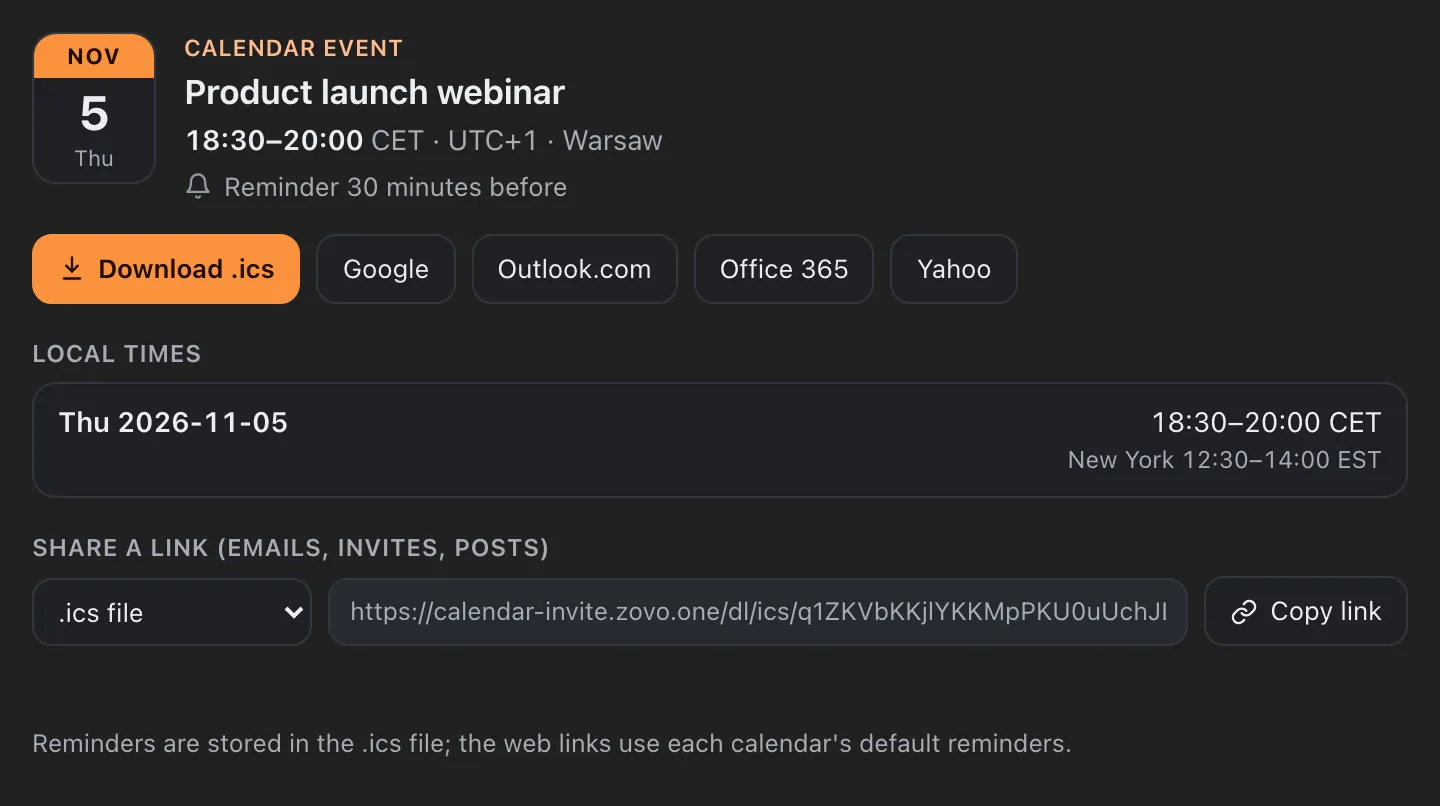
Make a calendar invite for 'Product launch webinar' on 2026-11-05 from 18:30 to 20:00 Warsaw time with a 30-minute reminder, and show the time in New York
CHECKED EXAMPLE · SYNTHETIC INPUT
Check one event in two time zones
A Warsaw webinar at 18:30 appears at 12:30 in New York on the same date.
Exact input: Title: Product launch webinar. Start: 2026-11-05T18:30; end: 20:00; zone: Warsaw; reminder: 30 minutes; viewer: New York.
| Zone | Start | End |
|---|---|---|
| Warsaw (CET) | 2026-11-05 18:30 | 20:00 |
| New York (EST) | 2026-11-05 12:30 | 14:00 |
Limit: InviteKit creates files and links; it does not email guests or change your calendar. The downloaded .ics contains the reminder; web links use calendar defaults.
Live MCP sample checked on 15 October 2026. Sample input only. No customer or family records were used. This sample does not certify every input or an installation in each AI app.
WHAT THE SERVER EXPOSES
2 functions to request.
Names and descriptions below come from live MCP discovery. They describe the server; they are not a test of every function in ChatGPT or Claude.
Generate calendar event file and links
generate_calendar_eventUse this when the user wants a calendar invite, an .ics file, or an add-to-calendar link (Google Calendar, Outlook, Office 365, Yahoo) for one event or one repeating event: a webinar, class, meeting, party, deadline, or launch. Takes the title, local start/end and the event's time zone (city or IANA zone), or dates only for all-day events, plus optional location, description, link, organizer name, reminders, and a repeat rule (daily, weekly on chosen weekdays, monthly by date, nth weekday such as the last Friday, or the first/last weekday of the month, yearly; with count, until date, and skipped dates). Returns a downloadable RFC 5545 .ics file with time zone data, four add-to-calendar links, and the first 5 dates in the event's zone and optional attendee zones, with daylight saving changes flagged. Does not send invitations, read or change anyone's calendar, or track RSVPs. Do not use for a list of different sessions (use generate_event_series) or for finding a meeting time across zones.
Generate calendar file for a schedule
generate_event_seriesUse this when the user wants one calendar file (.ics) that adds several different events at once: a course or class schedule, a training program, a conference agenda, match fixtures, or a list of webinars on irregular dates. Takes 1-40 sessions (each with its own start, end or duration, optional title, location and note) plus a shared time zone, location, details, link, organizer name and reminders. Returns one .ics file with one event per session and a dated list of the sessions. Does not make add-to-calendar web links per session, send invitations, or change anyone's calendar. Do not use for an event that repeats on a regular pattern (use generate_calendar_event with recurrence).
Connect. Ask. Check.
- Use the setup guide for ChatGPT or Claude. Copy this plugin's endpoint.
- Connect the tool. Paste the sample prompt and supply the inputs it needs.
- Review the result before you rely on it. Check the source tool's limits and privacy terms.
ADAPT THIS TASK TO YOUR WORK
Need a different input or output?
Start a brief from InviteKit Calendar Files. Describe your inputs, the result you need, and the checks that define a useful result. Download it before you share it.
The brief runs in your browser. Custom projects need a separate scope and price agreement.
EXPLORE THE SAME TASK CATEGORY
More planning tools.
These tools have reviewed releases in the dated fleet snapshot. Check each plugin's limits and setup before use.
Make a packing list you can check off and print.
Find the tasks that set a project’s duration and calculate their float.
Build a shift roster from staffing needs and availability.


COLLECTIONS